

Praxis360: Interactive Health and Safety Inspection Record
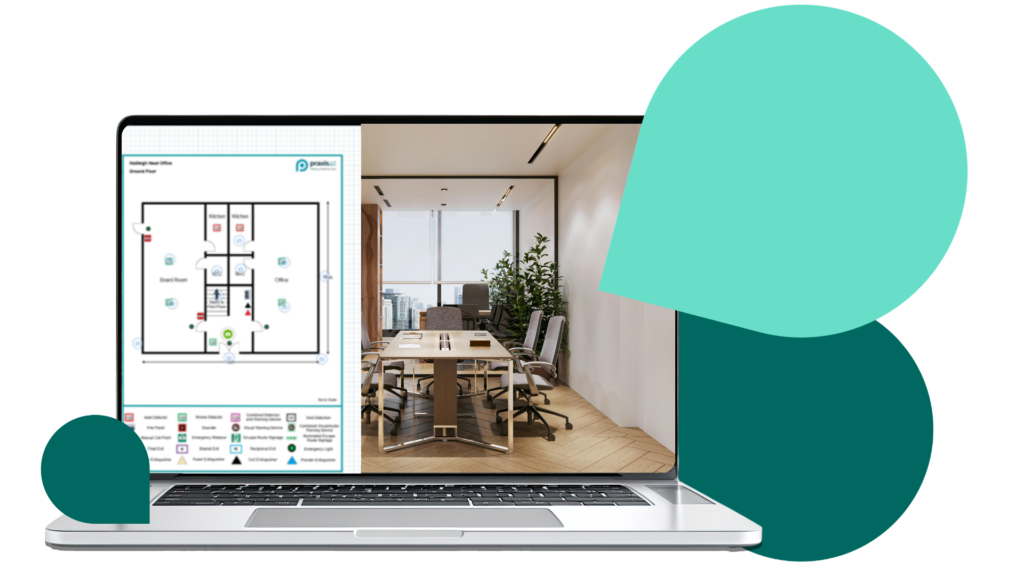
Praxis360 creates a clear, visual record of your premises during a health and safety inspection. Using advanced 360° imaging, it captures your building during a visit and turns it into an interactive view that can be accessed online.
The imagery enables you to revisit your premises after an inspection to review findings, plan improvements, and share a visual record of site conditions with colleagues and stakeholders. It also creates a reliable record of conditions at the time of the visit, helping you demonstrate compliance.
Important equipment and safety systems can be tagged within the imagery and linked to documentation such as service records or certificates, making it easier to locate equipment and manage associated compliance records.
How Praxis360 works
Praxis360 combines on-site expertise with advanced imaging technology to create an interactive visual record of your premises.
1. On-site 360° capture
Our health and safety consultant visits your premises and captures high-resolution 360-degree images across all agreed areas. This normally includes offices, workshops, storage areas, welfare facilities, circulation routes, and entrances.
2. Creation of a digital site model
The images are processed and mapped against your site layout, creating an interactive digital environment that enables users to explore the premises from multiple viewpoints.
3. Secure online access
The completed imagery is uploaded to a secure platform where authorised users can navigate through the building, review layouts, and zoom into specific areas.
4. Asset tagging and documentation
Key equipment within the premises can be tagged in the imagery, such as fire extinguishers, fire doors, electrical panels, or machinery. Each tag can store important information like service records, certificates, and maintenance details.
5. Ongoing reference and use
Praxis360 creates a time-stamped visual record and structured asset register that you can use to support governance, compliance and operational planning.
Benefits of Praxis360
- Stronger compliance: Praxis360 creates a time-stamped visual record of your premises as part of an inspection, risk assessment, or audit. This helps demonstrate due diligence and provides clear evidence of site conditions, layouts, and safety features.
- Saves time: The immersive imagery enables managers to review the layout of your premises, including access routes, circulation areas, and equipment locations, without needing to attend the site in person.
- Improved asset oversight: Assets (such as fire extinguishers, fire doors, electrical panels, or machinery) can be visually tagged and linked to documentation such as certificates, service records, and manuals. This makes it easier to locate equipment and access the records associated with it.
- More effective planning of improvements: Having a detailed visual reference of your premises makes it easier to plan maintenance, installations, or safety improvements following an inspection or audit.
- Better collaboration across teams: Facilities managers, health and safety professionals, and senior leadership can all access the same visual information. This supports clearer communication and more informed discussions about site risks, improvements, and operational changes.
- Consistency across multiple sites: For organisations with more than one location, Praxis360 provides a consistent way to document and review each premises. This helps maintain standards, compare sites, and support central oversight.
- A long-term digital record: The captured imagery and asset information create a permanent visual record of your premises that can be referred to when reviewing site changes or planning future work.
Clear evidence from every site inspection

See how Praxis42 turns a site visit into a visual record you can revisit after an inspection to plan improvements, share with stakeholders, demonstrate compliance, and support future decisions.

Frequently asked questions
Does Praxis360 replace a health and safety inspection?
No. Praxis360 does not replace a health and safety inspection or risk assessment. It is used alongside these services to create a visual record of the premises at the time of the visit. This can help you review findings, share information internally, and retain clear evidence of site conditions.
How is Praxis360 different from a site inspection report?
A traditional site inspection report or building inspection report contains written findings and photographs.
Praxis360 provides an interactive visual record of the entire site, enabling users to explore the premises as though they were there in person, to see layouts, equipment locations, and safety features as they appeared during the visit.
Will Praxis360 disrupt normal operations during a site visit?
No. The 360° imaging process is quick and non-intrusive. Our consultant captures images while moving through the premises as part of the inspection or audit, so disruption to normal operations is minimal.
Who in the organisation can access the imagery?
Access can be provided to authorised users such as health and safety managers, facilities managers, compliance teams, or senior leadership. This enables people who were not present during the health and safety site inspection to understand the layout and conditions of the premises.
How secure is the data captured by Praxis360?
All imagery and associated information are stored securely within the Praxis42 platform. Access is restricted to authorised users, ensuring that sensitive site information is protected.
Can Praxis360 be used across multiple sites?
Yes. Praxis360 is particularly useful for organisations with multiple locations. Each site can be captured and stored in a consistent format, making it easier to review different premises and maintain oversight across the organisation.
How do I see what Praxis360 looks like in practice?
You can request a demonstration of Praxis360 to see how the interactive imagery works and how it can support your health and safety inspections and site inspection reports.
Download our Praxis360 Brochure